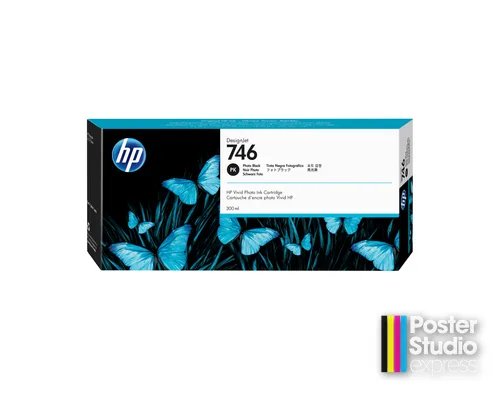
Description
Which printers take this part?
These machines work with two blacks, Photo Black and Matte Black; this cartridge is the Photo Black. Fitment runs across the DesignJet Z6 24-in, 44-in, Z6dr and Z6 Pro plus the Z9+ 24-in, 44-in, Z9+dr and Z9+ Pro — the Z6 platform underneath the Studio 44 and Studio 24 Pro included. Nothing in the T650, T830, T850, T870 or XT950 lines is listed for it.
What Photo Black does on this platform
Photo Black is for coated and glossy media and delivers deeper shadow detail on photographic and high-quality graphic output. The changeover is not a manual choice: the black the machine uses is decided by the media type configured for the job. A school printing photographs one week and matte classroom signage the next will work through both tanks, which is why the answer to “which black” is usually “keep one of each”.
Choosing a tank size for Photo Black
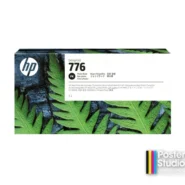
Tank size is the one lever on ink cost here: the bigger the tank, the less each milliliter inside it costs. We carry Photo Black in two sizes, and this 300-ml cartridge is the smaller of them. The other is 1XB11A, a 776 1-liter tank and the cheaper of the two per milliliter — but HP lists the 776 range for the Z9+ series only, so a Z6 cannot use it and a Z6 owner orders this part. We do not stock a 130-ml Photo Black in these families; 300 ml is the smallest we carry.
Don’t order this by mistake
Two things to check before this goes on a PO. The color word first: P2V83A is the 746 Matte Black, one word away on a shelf label and the wrong tank for coated or glossy stock. If the run is photographic, Photo Black is the one; if it is uncoated signage, it is the other. Then the family number: the 747 extension range carries no black at all, so a Z9+ owner scanning 747 part numbers for a Photo Black is reading the wrong list entirely.
Specifications
| HP part number | P2V82A |
|---|---|
| Type | Ink cartridge |
| Ink color | Photo Black |
| Cartridge volume | 300 ml |
| Cartridges per pack | 1 |
| Total ink per pack | 300 ml |
| Fits (HP models) | HP DesignJet Z6 series (24-in / 44-in / Z6dr / Z6 Pro); HP DesignJet Z9+ series (24-in / 44-in / Z9+dr / Z9+ Pro) |
| Fits (PSE lines) | Studio 24 Pro, Studio 44 |
Complete the set for your Z6 or Z9+
- HP 746 300-ml Matte Black (P2V83A)
- HP 746 300-ml Magenta (P2V78A)
- HP 746 300-ml Yellow (P2V79A)
- HP 746 300-ml Cyan (P2V80A)
- HP 746 300-ml Chromatic Red (P2V81A)
- HP 746 DesignJet Printhead (P2V25A)
Everything listed for your platform sits in one category: HP DesignJet Z6 ink or HP DesignJet Z9+ ink.
Ordering this part
Free shipping and school POs on every ink order. Genuine HP part.
Not sure which part fits your machine? Call 866-788-7900 or see all genuine HP parts by number.
Questions schools ask about this part
How does the printer decide between Photo Black and Matte Black?
By the media type configured for the job. Set a glossy or coated media profile and it uses Photo Black; set an uncoated or matte profile and it uses Matte Black.
Can we run the printer with only one black installed?
That is a question about your machine’s behavior rather than about this cartridge, and the material we hold does not answer it. Call 866-788-7900 before you let either black run dry and we will check it against your model.
Do you publish a print count for this tank?
No. The only honest number would be HP’s own published figure for P2V82A, and we do not hold it. A number we invented would be wrong the first time a job ran at a different coverage or on different stock.
Additional information
| Compatible printers | HP DesignJet Z6 series (24-in / 44-in / Z6dr / Z6 Pro), HP DesignJet Z9⁺ series (24-in / 44-in / Z9⁺dr / Z9⁺ Pro) |
|---|
You must be logged in to post a review.



Reviews
There are no reviews yet.