Experience Brightivity Live With a Free Zoom Demo
Book a free 30-minute Zoom call with a Poster Studio Express team member and watch Brightivity, our K-12 poster design and print-management software, in action. Bring your whole team, ask anything, and see exactly what Brightivity can do for your school.
- 100% free, no obligation
- 30 minutes, live on Zoom
- Real software, not slides
- Bring your whole team
Bring your principal or bookkeeper and get 5 free graphic organizer posters.
What We'll Show You in the Brightivity Demo
Every Brightivity demo is shaped around your school, but here's the typical agenda so you know exactly what to expect.
Your School & Your Goals
We start by listening. Tell us who prints at your school, what posters you make most, and what's slowing you down today. The rest of the Brightivity demo is built around your answers.
Canva & Drag-and-Drop Printing
See how Brightivity connects to a teacher's Canva account so designs print with no export step, and how to drag in a PDF, JPG, Word file, or Google Slides deck to print at the right size.
Templates & the Design Editor
Browse the 10,000+ curriculum-aligned template library, build a poster from scratch in the Design-a-Poster editor, and get a preview of the AI Poster Generator.
Scan-to-Poster Setup & Web-to-Poster
We'll show you where to set up your scanner for scan-to-poster and how AI upscaling works, plus how Web-to-Poster turns a web page into a poster from just its URL.
PrintCents & Admin Controls
This part is for your decision-makers: PrintCents shows the ink and cost of every print, and the My School admin console lets you assign licenses and approve or reject staff print jobs.
Your Questions & the Right Tier
We answer every question and explain which Brightivity tier (Elite, Advanced, or Lite) comes with each Poster Studio Express package, so you know exactly what your school would get.
Bring Your Principal, Get 5 Free Graphic Organizer Posters
When your principal, vice principal, bookkeeper, or another decision-maker joins your Brightivity demo on Zoom, your school picks any 5 graphic organizers from our free library after the call and we print them as 24×36 inch posters and ship them to your school for free. Limit 5 free posters per school.
Who counts as a decision-maker:
- Principal
- Vice Principal
- Assistant Principal
- Bookkeeper
- Business Manager
- Anyone who approves purchases
Book your Brightivity demo
Pick a 30-minute time slot in the scheduler below.
Bring a decision-maker and tell us on the call
Forward the Zoom link from your confirmation email so your decision-maker joins the live demo with you. Mention on the call that your principal or decision-maker is there.
Get confirmed, then email your 5 picks
At the end of the call, your Poster Studio Express team member confirms that your school qualifies. Then choose any 5 designs from the free graphic organizer library and email sales@posterstudioexpress.com with your name, your school name, the school's shipping address, and the name or link of each design.
We print and ship them free
Your 5 graphic organizers arrive at your school in 7–10 business days as 24×36 inch posters, ready to hang as class anchor charts.


Schedule Your Brightivity Demo in Under 60 Seconds
Choose a day and time for your free 30-minute Zoom demo. You'll get a calendar invite and a one-click join link right away.
 What you'll see
Poster Studio Express Brightivity Software
Powerful poster design at your fingertips.
Brightivity is the K-12 design and print-management software that comes free with every Poster Studio Express poster maker, with features that depend on your package. Here are the tools we walk through in the demo.
Real Canva Integration
Teachers sign in to Canva inside Brightivity and print their designs directly. No downloads, no exports.
10,000+ K-12 Templates
Curriculum-aligned designs for every subject, season, and event, ready to customize and print.
Scan-to-Poster + AI Upscaling
Scan a worksheet or photo and Brightivity upscales it into a crisp, wide-format classroom poster.
PrintCents Cost Tracking
See the ink used and the cost of every print, with per-user reports for budget documentation.
My School Admin Console
Assign licenses, set who can print directly, and approve or reject staff print jobs from one queue.
Print from Any Device
PCs, Macs, Chromebooks, iPads, and phones on the school network can all print to your poster maker.
Why a Live Brightivity Demo Beats a Brochure
Screenshots can't show you how fast Brightivity is. Thirty minutes live on Zoom will.
Built around your school
We skip what you don't need and spend the time on the posters, subjects, and workflows your staff actually care about.
The real software, not slides
Everything you see is Brightivity running live, from Canva designs and templates to print settings and the admin console.
Know which tier fits
Brightivity comes in Elite, Advanced, and Lite tiers depending on your package. We show you exactly which features each one includes.
Answers for decision-makers
Principals and bookkeepers see PrintCents cost tracking and admin print approval, the tools that keep the budget in check.
Everyone on one call
Teachers, librarians, tech staff, and admins can all join the same Zoom link and ask their own questions.
Zero pressure, ever
The demo is free with no obligation. Ask your questions, see the software, and decide on your own timeline.
Brightivity Comes Free With Every PSE Poster Maker
Every Poster Studio Express poster maker series ships with Brightivity, and your package decides which features you get. Explore the lineup before or after your demo.
Trusted by 4,600+ Schools
Real feedback from an educator whose school creates with a Poster Studio Express poster maker.
“Using our poster maker has been amazing for our school community. There is no limit to what our teachers have created to enhance their classroom environments. The poster maker saves precious time teachers used to use making anchor charts and allows them to be creative and engaging with their creations. The support Poster Studio Express gives is unmatched. When our poster maker was not working, I was able to get real human support in minutes. Then when the prognosis was not good for the printer, Mark was able to support us with getting the materials we needed for back-to-school night so that we could continue moving forward. We were so grateful for the support and pleasantly surprised with how Poster Studio Express goes above and beyond to ensure their customers are satisfied.”
Everything You Might Be Wondering About
Quick answers to the questions schools ask before booking. Don't see yours? Call 866-788-7900.
The Brightivity demo is a free, live 30-minute Zoom call where a Poster Studio Express team member walks you through Brightivity, our K-12 poster design and print-management software. You'll see how Canva printing works, the template library, where to set up scan-to-poster, PrintCents cost tracking, and the admin console, and you can ask questions the whole time.
The Brightivity demo is scheduled for 30 minutes. That covers the key features plus time for your questions. We tailor it to your school, so tell us up front if there's something specific you want to see.
Yes. The Brightivity demo is 100% free with no obligation to buy. Just pick a time in the scheduler and join the Zoom call.
No. Any school can book a Brightivity demo. The full Brightivity software comes free with every Poster Studio Express poster maker, so the demo is a great way to see what your school would get before you buy. Want to try it on your own? Brightivity Connect, the free version, is free for everyone and works with supported HP DesignJet and Canon poster printers.
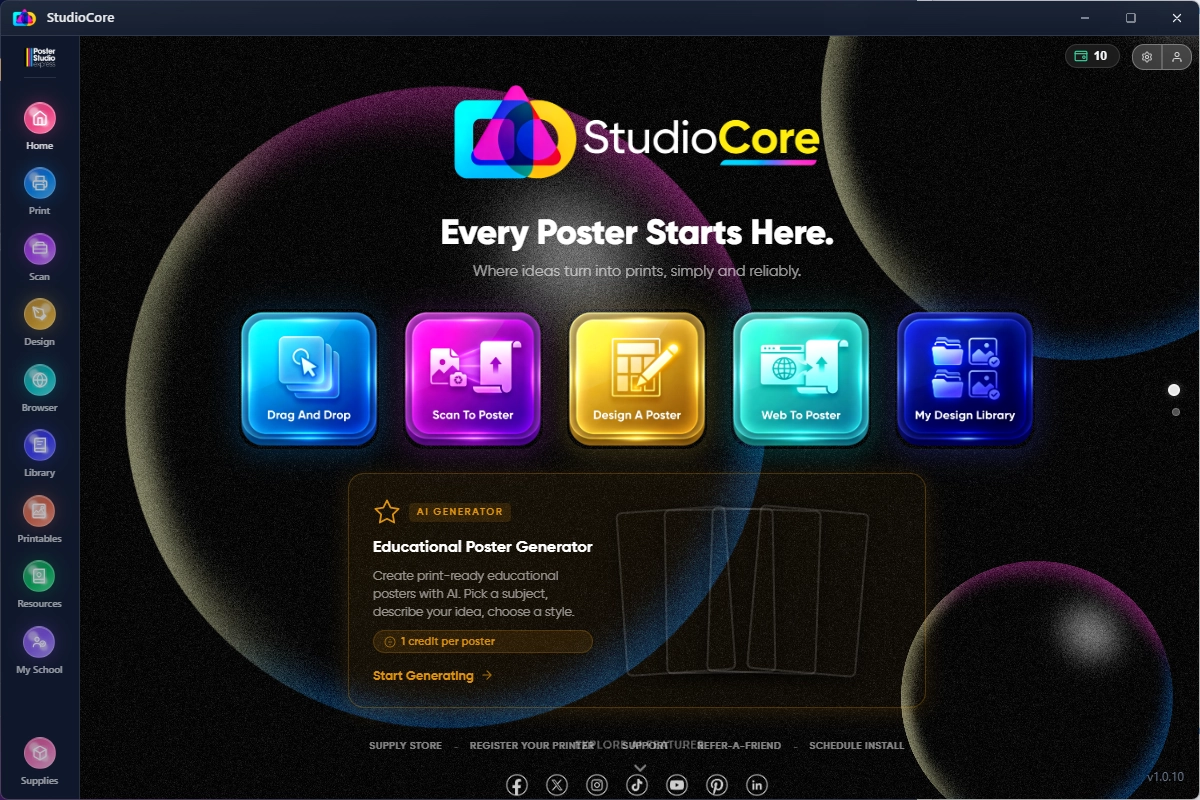
Yes. Schools that bought a poster maker from Poster Studio Express get upgraded to Brightivity, formerly StudioCore, for free as part of their poster maker package: all the features you trust, enhanced creative options for classroom creators, and a brighter new look. The features you get depend on the package you bought. Book a demo to walk your team through it, or book a free 15-minute software upgrade session if you just need a hand with the upgrade.
No. Brightivity comes in three tiers. Elite comes with Studio+ A+ and A packages, Advanced with Studio+ B+ and B packages, and Lite with Express C+ and C packages. Elite and Advanced include Canva integration, scan-to-poster, ink management, and lifetime design service. Lite includes drag-and-drop printing, the design editor, and the admin console. We'll show you the differences in the demo.
Yes. Brightivity has native Windows and macOS apps and also runs in a browser on Chromebooks, iPads, and phones. Any device on the school network can print to your Poster Studio Express poster maker.
Yes. Bring anyone who will use or approve Brightivity, including teachers, librarians, media specialists, tech coordinators, principals, and bookkeepers. Just share the Zoom join link from your confirmation email.
Bring a decision-maker, such as your principal, vice principal, assistant principal, bookkeeper, or business manager, on your Brightivity demo call and mention on the call that they're there. At the end of the call, your Poster Studio Express team member confirms that your school qualifies. Then choose any 5 designs from the Poster Studio Express graphic organizer library and email sales@posterstudioexpress.com with your name, your school name, the school's shipping address, and the name or link of each design. We print them as 24×36 inch posters and ship them to your school for free, arriving in 7–10 business days. The offer is limited to 5 free posters per school.
Ready to See Brightivity Live?
Pick a 30-minute time slot, bring your team, and see exactly how Brightivity works. Free demo, no obligation.